


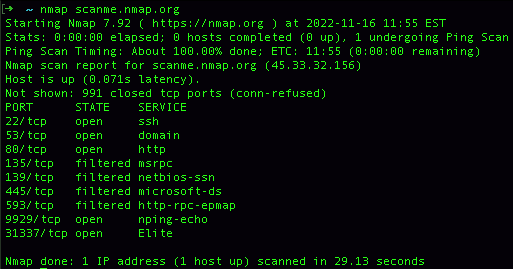
Nmap supports more than a dozen distinct scan types. The right choice depends on what privileges you have on the scanning host, what services you need to discover, and whether stealth matters for the engagement. The most common Nmap scan types are TCP SYN scan (-sS) for fast and quiet port discovery, TCP connect scan (-sT) for unprivileged users, UDP scan (-sU) for services like DNS and SNMP, and IP protocol scan (-sO) for non-TCP and non-UDP traffic. Each scan type sends different packets and applies different rules to the responses, which is why picking the wrong scan can produce misleading results, miss open ports, or take ten times longer than necessary.
After almost two decades teaching network security to students preparing for certifications like CompTIA PenTest+, CySA+, and Security+, the same problem appears in classroom labs over and over. Students learn the syntax. They do not learn when each scan is actually appropriate. They run a SYN scan against UDP services and report no findings. They use NULL scans against Windows hosts and conclude every port is closed. They set timing to -T5 against fragile production firewalls and trip an outage. Tool fluency without scan strategy leaves you running commands you do not understand.
Each Nmap scan type maps to a specific TCP/IP protocol behavior. If you know what packet your scan sends and what response your scan expects, you can predict the results before the command finishes.
What Is Nmap and Why Does the Scan Type Matter?
Nmap, short for Network Mapper, is an open source utility for network discovery and security auditing. Gordon Lyon created it in 1997, and it has been the most widely used port scanner in the security industry ever since. The tool works by sending crafted packets to target hosts and analyzing the responses to figure out which ports are open, what services are running, and which operating systems the hosts are using.
The scan type matters because TCP, UDP, ICMP, and SCTP behave differently when they receive unexpected packets. A closed TCP port responds with a RST. A closed UDP port might respond with an ICMP Port Unreachable message, send nothing back at all, or take seconds to reply because of kernel rate limits. Filtered ports behind a firewall sometimes drop packets silently and sometimes send a deceptive RST. These behavioral differences are exactly what Nmap scan types exploit. Each scan asks the target a slightly different question, and each question carries different costs in speed, stealth, and accuracy.
According to the official Nmap port scanning techniques documentationa scan that ignores these protocol differences can take ten times longer to complete, miss open ports through false negatives, or trigger detection systems that should have been bypassed. The difference between a SYN scan and a connect scan in a real engagement can mean finishing the assessment cleanly versus getting flagged within the first hour. For practical context on how port scanning fits into a broader assessment workflow, see our guide to what penetration testing actually involves.
TCP Connect Scan (-sT): The Default for Unprivileged Users
The TCP connect scan completes the full three-way handshake with every port it tests. Nmap calls the operating system’s standard connect() function, which sends a SYN, receives a SYN-ACK from open ports, and replies with an ACK to finish the connection. After the handshake completes, Nmap immediately tears down the connection with a RST or FIN.
This scan is the default mode when Nmap runs without root or administrator privileges. Forging raw TCP packets requires elevated permissions on every major operating system, so Nmap falls back to the standard sockets API when those permissions are missing. If you run Nmap from a regular user account, you get -sT whether you specified it or not.
The connect scan is the right choice when you do not have root or administrator access, when you are scanning through a SOCKS proxy or some other tool that only forwards completed connections, or when you specifically need to verify that a target service accepts full handshakes rather than just SYN packets. Avoid it for stealth-sensitive engagements, since the completed connection means application-layer logging on most services. Avoid it for scans across many ports, because completing the handshake roughly doubles the time per port compared to a SYN scan.
TCP SYN Scan (-sS): The Half-Open Standard
The TCP SYN scan, also called the half-open scan, is the most popular Nmap scan type and the right default for most professional work. It sends only the first packet of the handshake, the SYN, and reads the response. If the response is SYN-ACK, the port is open. A RST means it is closed. When nothing comes back at all, a firewall has probably filtered the probe.
The scan never completes the handshake, so the target’s application services usually do not log the connection attempt. This is why analysts call it a stealth scan, although that name oversells the technique on modern networks. Any reasonably current intrusion detection system flags floods of SYN packets without matching ACKs, and stateful firewalls track incomplete handshakes in their state tables. The SYN scan hides at the application layer, not at the network layer.
SYN scan needs raw socket access, which means root on Linux or Administrator on Windows. Without those privileges, Nmap silently falls back to -sT, which is one of the most common reasons students think they ran a SYN scan but actually ran a connect scan. Always verify your privileges before drawing conclusions from a -sS result.
Reach for the SYN scan when you have privileges, when you want fast results across many ports, when you want to avoid application logging, and as your default for almost every TCP assessment. On a fast network with -T4 timing, a SYN scan can cover thousands of ports per second.
UDP Scan (-sU): Slow but Necessary
UDP scanning is fundamentally different from TCP scanning because UDP is connectionless. There is no handshake to abuse and no state to track. When Nmap sends a UDP packet to an open port, the service might respond with a protocol-specific reply, ignore the packet, or send nothing at all. When Nmap sends a UDP packet to a closed port, the host typically responds with an ICMP Port Unreachable message, but only if the host is configured to send those messages and only at a rate the kernel allows.
This is the central problem with UDP scanning. Most operating systems rate-limit ICMP error messages aggressively. Linux, by default, sends only one ICMP unreachable per second. A 1000-port UDP scan against a Linux host therefore takes at least 1000 seconds even on a fast network. Anyone who has ever wondered why UDP scans run all day now has the answer.
You still need UDP coverage on most assessments. DNS (53), SNMP (161), DHCP (67/68), NTP (123), and a long list of other services run over UDP, and skipping them leaves a meaningful gap in your attack surface report. Combine -sU with -sV so Nmap sends protocol-specific probes that identify open ports without waiting for ICMP responses. When full UDP coverage is not required, limit scope with –top-ports 100 or a similar option. Run UDP scans alongside TCP scans rather than serially, so the slower job does not block the faster one.
TCP NULL, FIN, and Xmas Scans: Stealth Through Anomaly
These three scans abuse a quirk of RFC 793, the original TCP specification. The RFC says that a closed port must respond with a RST whenever it receives any TCP packet that does not have the SYN, RST, or ACK flag set. An open port, by contrast, must silently drop the same packet. Differences in flag handling let you determine port state by sending packets with deliberately strange flag combinations.
The three variants differ only in which flags they set. NULL scan (-sN) sends a packet with no flags set at all. FIN scan (-sF) sends a packet with only the FIN flag set. Xmas scan (-sX) sends a packet with the FIN, PSH, and URG flags all set, named after the Christmas tree appearance of all those flags lit up. Every variant relies on identical RFC behavior. A RST response means the port is closed. No response means the port is either open or filtered.
These scans can sneak past basic stateless packet filters that only inspect SYN packets, and they produce no application-layer log entries on most services. The catch is that Microsoft Windows does not implement RFC 793 correctly. Windows hosts respond with RST regardless of port state, which means NULL, FIN, and Xmas scans report every Windows port as closed. The technique works reliably only against Linux, BSD, macOS, and most Unix-like systems. Ironically, this Windows quirk turns the same scans into useful operating system fingerprinting tools.
ACK Scan (-sA): Mapping Firewall Rules
The ACK scan does not tell you whether ports are open. It tells you whether the path between you and the target is filtered. This sounds useless until you remember that distinguishing stateful from stateless firewalls is an important reconnaissance step before deciding which scan to run next.
The scan sends a TCP packet with only the ACK flag set. A stateless firewall might pass this packet through to the target host, which will respond with a RST regardless of whether the port behind it is open or closed. A stateful firewall sees an ACK with no matching handshake in its state table and drops or rejects the packet. By comparing which ports respond and which do not, you can map the firewall rules and decide whether SYN scans, NULL scans, or another technique will work for the open-port discovery phase.
Run ACK scans when you specifically need to map firewall behavior rather than identify open services. The output tells you which ports are filtered and which are unfiltered, which is exactly the input you need to plan the rest of the assessment.
Window Scan (-sW) and Maimon Scan (-sM): Niche Variants
The Window scan works exactly like the ACK scan but examines the TCP window field of the RST packet that comes back. On certain BSD-derived systems, the window value is non-zero for open ports and zero for closed ports. This is an undocumented implementation detail rather than standard behavior, so the scan only works against specific operating systems.
The Maimon scan, named for Uriel Maimon who first documented the technique, sends a packet with both FIN and ACK flags set. According to RFC 793, any port should respond with a RST to that combination. Some BSD-derived systems instead drop the packet for open ports, which allows differentiation. This is a niche scan that mostly appears on certifications and in specialized assessments against legacy BSD targets.
Both scans see almost no use in modern engagements. They show up regularly on certification exams that test deep Nmap knowledge, particularly the OSCP and PenTest+ practical components, so know they exist even if you rarely run them in production.
Idle Scan (-sI): The Truly Anonymous Scan
The idle scan is the most technically interesting Nmap scan type. It lets you scan a target without sending any packets from your own IP address. Instead, you abuse a third-party host called a zombie, whose IP ID sequence numbers you can predict.
The technique works because some operating systems generate IP ID values incrementally. By sending probe packets to the zombie and watching how its IP ID changes, you can infer whether the zombie sent any packets in between your probes. If you spoof packets to your real target with the zombie’s IP address, the target’s response goes to the zombie, which will or will not send its own response packets depending on whether the target port was open. Measuring the zombie’s IP ID before and after the spoofed probe tells you the port state on the target.
This is the only Nmap scan that does not reveal your IP address to the target. The trade-off is significant. Idle scans are slow because they require multiple round trips per port. They are fragile because the zombie host has to remain idle during the scan, and any unrelated network traffic from the zombie corrupts your results. Most importantly, finding a working zombie is difficult in 2026 because modern operating systems randomize IP IDs specifically to defeat this scan. Older embedded devices and network printers still work occasionally, but you should not count on the idle scan as a primary technique on a current engagement.
SCTP and IP Protocol Scans (-sY, -sZ, -sO)
SCTP is a transport layer protocol used primarily in telecommunications, particularly for SS7 signaling and WebRTC media streams. If your assessments do not include telecom infrastructure, you will probably never need an SCTP scan. If they do, the SCTP scans are essential and have no real substitute.
The SCTP INIT scan (-sY) sends an SCTP INIT chunk, which is the SCTP equivalent of a TCP SYN. An INIT-ACK response means the port is open. The SCTP COOKIE-ECHO scan (-sZ) is similar in concept to the FIN, NULL, and Xmas scans, exploiting protocol behavior to identify open ports without completing a full SCTP association.
The IP protocol scan (-sO) does not look at ports at all. It identifies which IP protocols the target supports. Most networks support TCP (protocol 6), UDP (protocol 17), and ICMP (protocol 1), but you might also encounter IGMP (protocol 2), GRE (protocol 47), ESP (protocol 50), AH (protocol 51), or others. Run the IP protocol scan when you are doing thorough reconnaissance of a router or firewall, when you suspect VPN tunnels using ESP or GRE, or when you want to map the full protocol attack surface of an unfamiliar network device.
Service Version Detection (-sV) and OS Detection (-O)
Strictly speaking, version detection and OS detection are not separate scan types. They are options that ride on top of any scan you run. Both are essential for serious assessments, so they belong in any practical guide to Nmap.
Adding -sV tells Nmap to send service-specific probes to identify what is actually running on each open port. The output goes from “port 80 is open” to “port 80 is running Apache 2.4.41 on Ubuntu Linux.” Version detection is significantly slower than basic port scanning because it sends multiple probes per port and waits for responses. It is also the most useful step for vulnerability assessment, since matching CVEs to services requires knowing exact service versions.
Adding -O tells Nmap to send a series of probes designed to fingerprint the TCP/IP stack of the target. Different operating systems implement TCP/IP slightly differently, and these implementation details create a fingerprint that Nmap matches against its database of known signatures. OS detection requires at least one open port and at least one closed port to work reliably. It is also less accurate when the target sits behind NAT or when intermediate devices modify packets along the path.
Run -sV on every assessment unless you have a specific reason to skip it. Add -O when you need operating system information for vulnerability matching or for follow-up exploitation planning. The combined command -sS -sV -O is the right starting point for almost any TCP assessment.
How Do Nmap Scan Types Compare?
A quick reference for picking the right scan for the job. Each entry shows the flag, what privileges it requires, what kind of result it returns, and the situation where it earns its place.
Which Nmap Scan Should You Use?
After running thousands of scans across classroom labs and professional engagements, a few rules of thumb hold up consistently. They will not cover every situation, but they will cover most of them.
The default starting command for any TCP assessment with privileges is -sS -sV -O, which gives you port states, service versions, and operating system information in a single pass. When UDP coverage matters but a full UDP scan is too slow, add -sU –top-ports 100 -sV to catch the most common UDP services without spending 12 hours on the scan.
The TCP connect scan (-sT) is the right choice only when you must take it, either because privileges are missing, because you are scanning through a tool that requires completed connections, or because the assessment specifically needs full handshakes verified. The flag-anomaly scans -sN, -sF, and -sX become useful when you suspect a stateless firewall is dropping SYN packets, or when you want to fingerprint whether the target is Linux or Windows. The ACK scan -sA earns its place when you need to map firewall rules rather than identify services, since its output tells you which ports are filtered and which are unfiltered.
Idle scan (-sI) belongs in the toolkit but rarely on the daily checklist. Reserve it for engagements where attribution matters more than scan quality. The technique is slow and fragile and depends on finding a working zombie host, but the privacy benefit has no equivalent when you actually need it.
For a thorough understanding of what scanned traffic actually looks like on the wire, the Wireshark fundamentals guide covers how to capture and read each scan type as it happens. Pairing Nmap output with packet captures is one of the fastest ways to build real fluency in scan behavior.
What Are Common Mistakes With Nmap Scan Types?
After watching thousands of students run Nmap in classroom and lab settings, the same errors appear over and over. Most are easy to fix once you know what to look for.
The most common mistake is running UDP scans without -sV. A bare UDP scan reports most ports as open|filtered because absence of a response could mean either state. Adding service version detection sends protocol-specific probes that resolve the ambiguity, often dramatically reducing the number of unknown results.
Aggressive timing on production systems trips up almost as many students. The -T4 and -T5 timing templates can overwhelm fragile devices. Routers, IoT devices, and old Windows boxes have crashed during scans set too aggressively. -T3 is the default for a reason, and -T4 should be reserved for networks you know can handle the load.
Another common error is trusting NULL, FIN, or Xmas scan results against Windows hosts. Windows does not implement RFC 793 properly, so these scans report every Windows port as closed regardless of actual state. Always verify Windows targets with a SYN or connect scan before drawing conclusions.
Forgetting to scan all 65535 ports comes up in almost every comprehensive assessment. By default, Nmap scans only the top 1000 most common TCP ports. Skipping the rest can hide services running on non-standard ports, which is exactly where attackers prefer to operate. Use -p- to scan every port when the assessment requires it.
Skipping version detection rounds out the list. Port 8080 being open is interesting. Port 8080 running Apache Tomcat 9.0.30 with a known authentication bypass is what the report needs to say. Adding -sV is what turns a basic port scan into a vulnerability finding.
For deeper context on how scanning fits into the broader security testing methodology, the NIST Special Publication 800-115 Technical Guide to Information Security Testing and Assessment covers port scanning in the context of network discovery, vulnerability identification, and penetration testing phases. It is the closest thing to an authoritative methodology document for this work.
Frequently Asked Questions
What is the most common Nmap scan type?
The TCP SYN scan (-sS) is the most common Nmap scan type. It is fast, requires only one packet per port, and avoids application-layer logging on most services. The trade-off is that it requires root or administrator privileges to send raw packets, which is the only reason analysts ever default to other scan types.
Which Nmap scan is the stealthiest?
The idle scan (-sI) is the only Nmap scan that does not reveal your IP address to the target. It uses a third-party zombie host with predictable IP ID sequencing. The cost is speed and reliability, since idle scans run slowly and require finding a suitable zombie that stays idle during the scan. For application-layer stealth without that complexity, the SYN, NULL, FIN, and Xmas scans all avoid logging on most services.
Why is UDP scanning so slow?
UDP scanning is slow because most operating systems rate-limit the ICMP Port Unreachable messages that Nmap relies on to identify closed ports. Linux sends one ICMP unreachable per second by default, so a 1000-port UDP scan takes at least 1000 seconds. Adding -sV with protocol-specific probes can speed up UDP scans dramatically when target services respond directly to the probe data.
Do you need root privileges to run all Nmap scans?
No. The TCP connect scan (-sT) works without elevated privileges because it uses the operating system’s standard connect() function. Every other major scan type, including SYN, NULL, FIN, Xmas, ACK, Window, Maimon, idle, SCTP, and IP protocol scans, requires raw socket access, which means root on Linux or Administrator on Windows.
Can Nmap scans crash systems?
Yes, particularly with aggressive timing templates like -T4 or -T5 against fragile devices. IoT devices, older routers, and legacy embedded systems have all been knocked offline by overly aggressive scans. Use -T3 as a default and only move to faster timing when you know the target network can handle the load.
What is the difference between a SYN scan and a connect scan?
A SYN scan (-sS) sends only the first packet of the TCP three-way handshake and never completes the connection, which is why it is called a half-open scan. A connect scan (-sT) completes the full handshake before tearing down the connection. SYN scans require root privileges, run faster, and avoid application logging. Connect scans work without privileges but run slower and trigger logging on most target services.
Are Nmap scans legal?
Scanning systems you own or have written authorization to test is legal in most jurisdictions. Scanning systems without permission can violate laws like the United States Computer Fraud and Abuse Act and similar statutes in other countries. Always have a written scope of work in hand before running Nmap against any system you do not own.

Director, Educational Services | Training Camp
Mark Sabo is the Director of Educational Services at Training Camp, where he oversees the training team, course design, and certification program development. He holds a B.S. in Information Sciences and Technology from Penn State University and more than 50 industry certifications. Mark joined Training Camp in 2005, became a Technical Trainer in 2007, and assumed his current leadership role in 2015. His specialty is practice exam development and exam preparation strategy, built from years of teaching students in the classroom and studying how certification exams are constructed. His writing focuses on the technical details that matter most to professionals preparing for high stakes exams.