
Hello, you are using an old browser that's unsafe and no longer supported. Please consider updating your browser to a newer version, or downloading a modern browser.

Award Winning CompTIA Platinum Partner

CompTIA Linux+ Self-Paced Training

Administering and securing Linux systems: system management, services and user management, security, automation and scripting, and troubleshooting. Every exam domain, at your own pace.

Student
Student
Student
Join 250,000+ certified alumni.
CISSP Professional

Master Linux+

On-Demand

Official CompTIA

Authorized Training

Learn at Your Pace. Pass When You’re Ready.

Complete Bundle. Exam Included. 365-Day Access.
On-Demand Access A full year to work through videos, labs, and practice exams at your own pace.
Your Success.

The Training Camp Linux+ Complete Online Bundle includes everything you need—self-paced video lessons, interactive labs, practice exams, and your CompTIA exam voucher. Study on your schedule and test when you're ready.

Program Abstract

REF: Linux+-2025 6
Curriculum aligned to the latest Exam Outline.
Format Self-Paced, Complete Online Bundle
Access 365 Days

The Linux+ is Hard. We Know How to Pass It.

You don't need a classroom to pass Linux+—you need the complete bundle from Training Camp. This comprehensive package includes self-paced video lessons mapped to official CompTIA exam objectives, interactive knowledge checks, performance-based labs, and exam-style practice questions. With 365 days of access and your CompTIA exam voucher included, you can study at your own pace and test at Pearson VUE when you're confident.

Complete Online Bundle.

Everything you need in one packageVideo lessons, labs, practice exams, and exam voucher—all mapped to CompTIA objectives—aligned to Official CompTIA exam objectives and ready to go.

Bundle Contents
Video Lessons Included
Performance-Based Labs Included
Practice Exams Included
Exam Voucher INCLUDED

Labs, Practice Exams & More.

Performance-based labsHands-on activities that mirror real CompTIA exam scenarios, exam-style practice questions, interactive knowledge checks, and downloadable study resources. All mapped to Official CompTIA objectives.

Video Library

Video Lessons

Self-paced video content mapped to CompTIA objectives.

Hands-On

Performance Labs

Interactive labs that mirror real exam scenarios.

Practice Engine

Exam Simulator

Practice exams with detailed answer explanations.

Resources

Study Materials

Downloadable guides, checklists, and reference sheets.

365 Days + Exam Voucher.

365 days to master the material. CompTIA exam voucher includedYour Linux+ exam fee is included—schedule at Pearson VUE when ready.—test at a testing center or online proctored.

Day 1
Instant Access Start your CompTIA training immediately after enrollment.
Begin Learning
365 Days Access
Labs & Practice Exams Build skills with labs and verify readiness with practice exams.
Build Mastery
When Ready
Exam Voucher Ready Schedule at Pearson VUE testing center or online proctored.
Get Certified
·
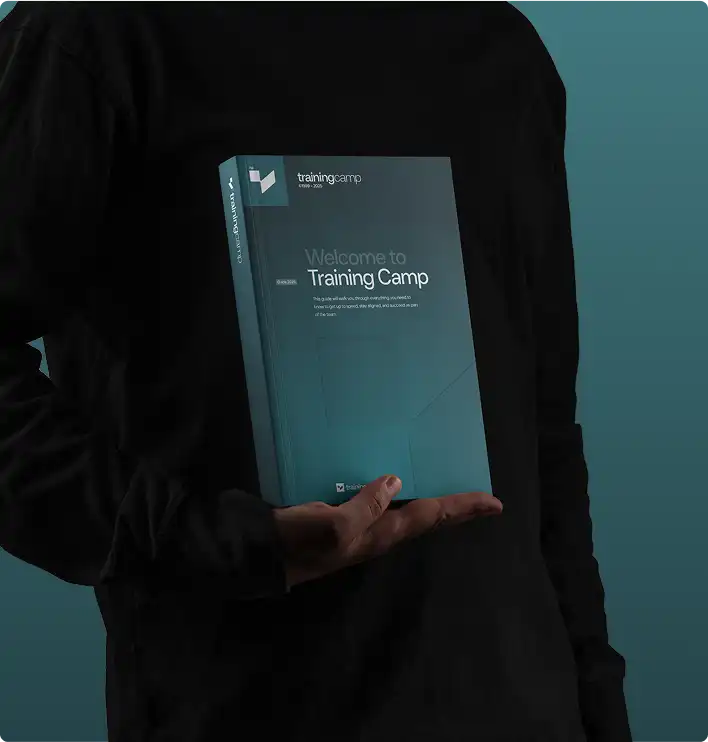
Linux+ training materials including coursebook and study guides
Official Materials
Same courseware used in our live bootcamps.

"Everything you need in one package—I passed on my first try studying just 2 hours a day."

Self-Paced Student

Verified Linux+ Graduate

Why Choose Self-Paced?

Your Schedule
✓

Fits Your Life

Study around work, family, and life. No need to take time off or travel.

  • No travel required
  • Study anytime
$

Lower Cost

Same quality content at a fraction of bootcamp pricing. No hotels, flights, or meals to budget.

  • Exam voucher included
  • No travel expenses
Offer

Save on this course with a current special offer

Team pricing, military discounts and a limited-time offer of the week. See what applies before you book.

See special offers
Get Started Today

Explore Your Training Options

Tell us about your training needs and we'll create a personalized plan.

Award ribbon icon

Official CompTIA Courseware

Study for the CompTIA Linux+ exam with authorized CompTIA courseware, updated whenever the exam objectives change, so your material never goes stale.

Clock icon

365 Days of Access

Study Linux+ on your own schedule for a full 365 days. Access starts the day you enroll, at whatever pace suits you.

Flower icon

Exam Voucher Included

Your Linux+ exam fee is covered. The CompTIA Linux+ self-paced training includes the voucher, so book with the testing provider when you feel ready.

Light bulb icon

Every Domain Covered

Cover all five Linux+ exam domains, from System Management through Troubleshooting, so nothing on the exam blueprint goes unstudied before test day.

Stars icon

Practice Before You Sit

Measure your readiness before booking the Linux+ exam. Practice questions and review tools show exactly where you stand, so you test only when prepared.

Sunglasses icon

Built Around Your Job

Earn Linux+ around a full-time job. No travel and no fixed class times, so you study on evenings, weekends, or whenever you have time.

CompTIA Linux+ Self-Paced Training

Accepting Inquiries
+1

    Eligible for Special Pricing?

    We respect your privacy. No spam.

    COURSE STRUCTURE

    What the Linux+ Exam
    Covers

    Every domain the exam tests, and what sits inside it.
    Work through them in any order, at whatever pace suits you.

    EXAM DOMAIN

    Self-Paced Topics: 8
    START HERE
    On the Exam

    Getting Started

    Activate Platform Access and Download Official Courseware
    L.prep.1
    Review the XK0-006 Exam Objectives and Domain Weights
    L.prep.2
    Build a Weekly Study Planner for 365 Days of Access
    L.prep.3
    Take the Baseline Assessment to Find Weak Domains
    L.prep.4
    Learn How to Use the Question Bank and Flashcards
    L.prep.5
    Launch the Performance-Based Lab Environment
    L.prep.6
    Understand Pearson VUE Scheduling and Exam Voucher Use
    L.prep.7
    Set Milestone Dates for Domain Reviews and Practice Exams
    L.prep.8

    EXAM DOMAIN

    Self-Paced Topics: 16
    DOMAIN 1
    On the Exam

    System Management (23%)

    Linux Distributions, Filesystem Hierarchy and Boot Process
    L.01.1
    GRUB, systemd Targets and Kernel Modules
    L.01.2
    Device Management with lsblk, lspci and udev
    L.01.3
    Managing Network Services and Interface Configuration
    L.01.4
    Name Resolution, Routing and Firewall Basics
    L.01.5
    Shell Operations: Redirection, Pipes and Globbing
    L.01.6
    Lab: Configure Network Interfaces and Routes
    L.01.7
    Lab: Inspect and Load Kernel Modules
    L.01.8
    Partitioning, Filesystems and Mounting with fstab
    L.01.9
    Logical Volume Manager and RAID Configuration
    L.01.10
    Managing Swap, Quotas and Disk Usage
    L.01.11
    Backup and Restore with tar, rsync and dd
    L.01.12
    Virtualization Concepts and KVM on Linux
    L.01.13
    Cloud-Init and Image-Based System Provisioning
    L.01.14
    Lab: Create an LVM Volume and Mount It
    L.01.15
    Domain 1 Knowledge Check and Objective Review
    L.01.16

    EXAM DOMAIN

    Self-Paced Topics: 16
    DOMAIN 2
    On the Exam

    Services and User Management (20%)

    File and Directory Permissions, Ownership and ACLs
    L.02.1
    Special Bits: SUID, SGID and the Sticky Bit
    L.02.2
    Local Account and Group Management
    L.02.3
    Password Policies, sudo and PAM Configuration
    L.02.4
    Process Management with ps, top and kill
    L.02.5
    Job Scheduling with cron, at and systemd Timers
    L.02.6
    Lab: Set ACLs and Special Permission Bits
    L.02.7
    Lab: Schedule Recurring Jobs with systemd Timers
    L.02.8
    Package Management with apt, dnf and rpm
    L.02.9
    Repositories, Source Builds and Dependency Handling
    L.02.10
    Managing Units and Services with systemctl
    L.02.11
    Analyzing Boot and Service Logs with journalctl
    L.02.12
    Container Fundamentals with Podman and Docker
    L.02.13
    Building Images and Running Containerized Apps
    L.02.14
    Lab: Manage a Service and Its Logs with systemd
    L.02.15
    Domain 2 Knowledge Check and Objective Review
    L.02.16

    EXAM DOMAIN

    Self-Paced Topics: 16
    DOMAIN 3
    On the Exam

    Security (18%)

    Authentication, Authorization and Accounting Methods
    L.03.1
    Centralized Auth with LDAP and Kerberos
    L.03.2
    Configuring firewalld, nftables and iptables
    L.03.3
    SELinux and AppArmor Mandatory Access Control
    L.03.4
    OS Hardening: Services, Ports and Baselines
    L.03.5
    Account Hardening and Login Restrictions
    L.03.6
    Lab: Configure firewalld Zones and Rules
    L.03.7
    Lab: Set SELinux Booleans and Contexts
    L.03.8
    SSH Key Management and Hardened sshd Config
    L.03.9
    TLS Certificates and the OpenSSL Toolkit
    L.03.10
    Disk and File Encryption with LUKS and GPG
    L.03.11
    Hashing, Signing and Integrity Verification
    L.03.12
    Audit Logging with auditd and Rules
    L.03.13
    Compliance Benchmarks and Vulnerability Scanning
    L.03.14
    Lab: Harden SSH and Deploy Key-Based Login
    L.03.15
    Domain 3 Knowledge Check and Objective Review
    L.03.16

    EXAM DOMAIN

    Self-Paced Topics: 16
    DOMAIN 4
    On the Exam

    Automation, Orchestration, and Scripting (17%)

    Automation and Orchestration Use Cases and Tools
    L.04.1
    Bash Scripting: Variables, Conditionals and Loops
    L.04.2
    Functions, Exit Codes and Error Handling
    L.04.3
    Parsing Text with grep, sed and awk
    L.04.4
    Python Basics for System Administration
    L.04.5
    Scheduling and Triggering Automated Tasks
    L.04.6
    Lab: Write a Bash Script to Automate a Task
    L.04.7
    Lab: Parse Log Output with sed and awk
    L.04.8
    Git Fundamentals: Clone, Commit, Branch and Merge
    L.04.9
    Resolving Conflicts and Working with Remotes
    L.04.10
    Infrastructure Automation with Ansible Concepts
    L.04.11
    Idempotency and Configuration Management Patterns
    L.04.12
    CI/CD Pipeline Concepts for Linux Workloads
    L.04.13
    Responsible and Secure Use of AI Tools
    L.04.14
    Lab: Initialize a Git Repo and Manage Branches
    L.04.15
    Domain 4 Knowledge Check and Objective Review
    L.04.16

    EXAM DOMAIN

    Self-Paced Topics: 16
    DOMAIN 5
    On the Exam

    Troubleshooting (22%)

    System Monitoring with top, vmstat and sar
    L.05.1
    Reading Logs for Fault Diagnosis
    L.05.2
    Hardware Faults: CPU, Memory and Devices
    L.05.3
    Storage Issues: Full Disks, Inodes and Corruption
    L.05.4
    Filesystem Repair with fsck and Mount Recovery
    L.05.5
    Boot Failures and Rescue Mode Recovery
    L.05.6
    Lab: Diagnose and Repair a Failed Filesystem
    L.05.7
    Lab: Recover a System That Fails to Boot
    L.05.8
    Network Diagnostics with ip, ss and tcpdump
    L.05.9
    DNS, Routing and Connectivity Troubleshooting
    L.05.10
    Diagnosing Permission and SELinux Denials
    L.05.11
    Investigating Failed Services and Dependencies
    L.05.12
    CPU, Memory and I/O Performance Bottlenecks
    L.05.13
    Tuning Kernel Parameters with sysctl
    L.05.14
    Lab: Capture and Analyze Traffic with tcpdump
    L.05.15
    Domain 5 Knowledge Check and Objective Review
    L.05.16

    EXAM DOMAIN

    Self-Paced Topics: 8
    START HERE
    On the Exam

    Exam Prep

    Full-Length Timed Practice Exam Across All Five Domains
    L.prep.1
    Review Missed Questions Against the XK0-006 Objectives
    L.prep.2
    Targeted Review of System Management and Troubleshooting
    L.prep.3
    Command Recall Drill and Performance-Based Question Practice
    L.prep.4
    Second Full-Length Practice Exam and Score Comparison
    L.prep.5
    Schedule the XK0-006 Exam at Pearson VUE
    L.prep.6
    Exam-Day Logistics, ID Requirements and Time Management
    L.prep.7
    Exam: XK0-006
    L.prep.8
    COURSE PROGRESS Domain 0 of 6
    Frequently Asked Questions

    Linux+ Self-Paced
    Questions, Answered

    Real questions from real professionals who passed.
    Here's how we answer them.

    Official CompTIA courseware, on-demand video instruction, practice questions and your Linux+ exam voucher, with 365 days of access from enrollment. Everything is online, so you start the day you enroll.

    365 days from the date you enroll. There is no fixed schedule and no cohort to keep up with — you work through the material at whatever pace fits around your job.

    Yes. Your Linux+ exam voucher is included in the price, so there is nothing further to buy before you sit the exam. You book it with the testing provider once you are ready.

    Linux+ (XK0-006) has five exam domains: System Management, Services and User Management, Security, Automation, Orchestration and Scripting, and Troubleshooting. The course is organized the same way, so each section maps to the domain it prepares you for.

    Yes. Training Camp is an authorized CompTIA training partner and this course uses official CompTIA Linux+ courseware, kept aligned to the current exam version.

    It suits administrators managing and securing Linux systems. Self-paced study works best if you want to fit certification around existing work commitments.

    Yes. Our Success Guarantee lets you apply 100% of your self-paced course investment toward any of our live Linux+ training classes within 30 days of your initial purchase. Contact the enrollment team and they will handle the transfer and help you pick a class date. Self-paced itself does not include an exam retake.

    Get the Free
    Linux+ Exam Guide

    • Expert strategies to spot trick questions
    • Question patterns examiners actually use
    • Proven pacing + pressure management tactics
    Articles and Certification Resources

    Training Camp
    Articles

    Dive into our library of articles covering today’s most in-demand IT certifications, from cybersecurity and cloud to networking and project management. You’ll find practical tips, exam prep strategies, and industry updates to help you advance your career.

    Weighing this against another certification? Compare them head to head in Certification Matchups →

    Student Success Stories

    What Our Students Say

    Join thousands of certified professionals who trained with Training Camp

    ★★★★★

    Switched careers from retail to IT at 35. No tech background but the course starts from basics. Now making double my old salary. Only wish I’d done this so...

    DK
    Dav** Kim F**ld Service Technician
    ★★★★★

    Failed Network+ twice before finding this. CertMaster Practice identified my weak spots perfectly. Third time was the charm. Now pursuing Security+ with same pla...

    AF
    Ama*** Fos*** N** Technician
    ★★★★★

    The bite-sized lessons fit my ADHD brain perfectly. Could do 15 minutes here and there.

    KO
    Kev** O&#********** S**es Engineer
    ★★★★★

    Loved the progress tracking. Seeing those green checkmarks kept me motivated. Finished Sec+ in 5 weeks studying 1 hour daily.

    NP
    Nat*** Par* S**tems Engineer
    ★★★★★

    The structured curriculum kept me focused. The visual lessons and hands-on labs clicked for me. Passed Network+ after years of thinking I couldn’t do IT.

    Continue Your Journey

    Linux+ SP Related Courses

    Advance your career with these recommended certifications

    Featured on